 27°C
27°C

Dominican Republic E-Ticket: A Complete Guide for Travelers
Anyone traveling to the Dominican Republic on a commercial flight must complete the country’s free electronic entry and exit form, known as the E-Ticket. The process is completed online and generates a QR code that travelers should save for their journey. This guide explains how to apply, what information you need, when to complete the form, how it works for families and which mistakes to avoid before heading to the airport.


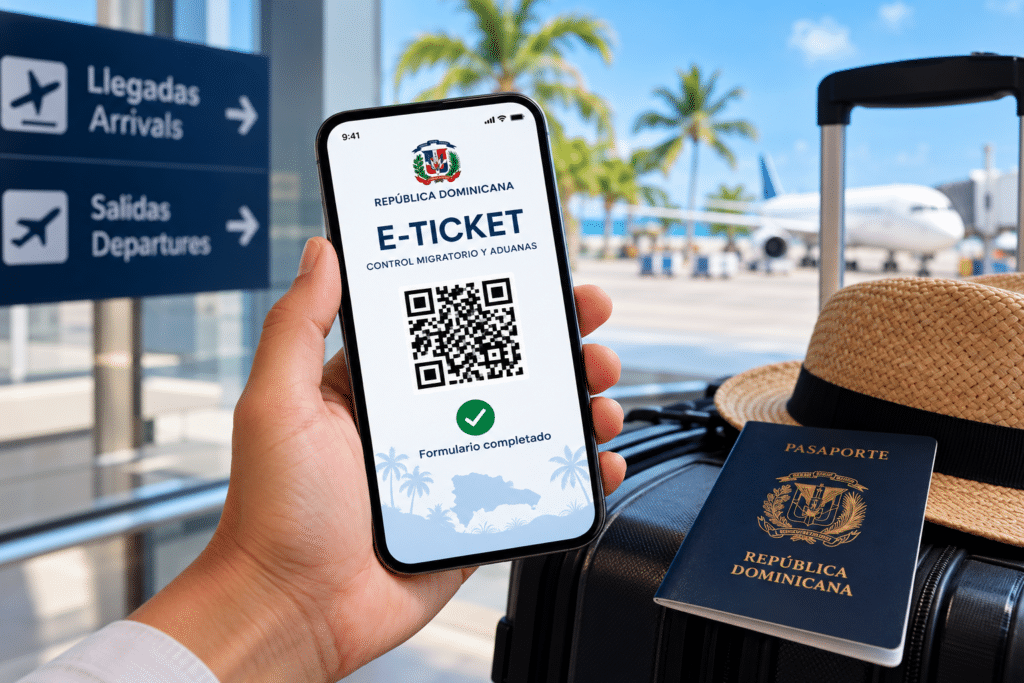
The Dominican Republic E-Ticket is a mandatory digital form for passengers entering or leaving the country on commercial flights. It collects information required by Dominican immigration and customs authorities in a single online process.
Travelers complete the form through the official government portal, free of charge. Once the process is finished, the system generates a confirmation with a QR code. Passengers should save this confirmation and have it available when requested by their airline or the relevant authorities.
The E-Ticket is not a plane ticket, visa or separate travel authorization. It is an administrative form that must be completed in addition to meeting the country’s applicable passport, visa and entry requirements.
What Is the Dominican Republic E-Ticket?
The E-Ticket is the Dominican Republic’s electronic passenger entry and exit form. It was introduced to bring several travel declarations together in a digital system, including immigration information and customs declarations.
The form is administered through the country’s official government system and is intended to provide passenger information to the Dirección General de Migración (General Directorate of Migration) and the Dirección General de Aduanas (General Directorate of Customs).
Although the word “ticket” can suggest a boarding pass or travel document, the E-Ticket does not replace your passport, airline ticket or any visa you may need. It records information about your trip and confirms that you have completed the required declaration.
Who Needs to Complete the E-Ticket?
According to the Dominican Republic’s official tourism guidance, all Dominican and foreign passengers entering or departing the country on commercial flights must complete the E-Ticket. The requirement applies to tourists, returning residents and Dominican nationals traveling internationally.
If you are visiting Punta Cana, Santo Domingo, Puerto Plata, La Romana or another destination in the country by commercial air service, you should plan to complete the form for your arrival and departure.
The official tourism website states that passengers arriving on private flights, noncommercial vessels, ferries and cruise ships do not need to use the E-Ticket under the procedure described for those travelers. Physical customs and international embarkation or disembarkation forms may be accepted in those cases. Travelers using these transport options should confirm the applicable procedure with their operator or the authorities before departure.
Where to Get the Official Dominican Republic E-Ticket
The E-Ticket is available online through the Dominican government’s official portal:
Complete the Dominican Republic E-Ticket
The government also provides information and instructions through the official Traveler’s Digital Guide and the Dominican Republic Ministry of Tourism’s entry requirements page.
The E-Ticket is free. You do not need to pay a third-party company to complete the official form. Be cautious of websites that charge a processing fee or imitate the official service. Check the web address before entering your passport details or other personal information.
When Should You Complete the E-Ticket?
You no longer need to complete the E-Ticket specifically within the 72 hours before your flight. The official tourism website says travelers can fill it out as soon as they have their flight information, even months in advance.
However, the form must be completed before you arrive at the airline check-in counter at the airport. Airlines may ask to see the confirmation to verify that the required information has been submitted.
If you’re planning to travel to the Dominican Republic, it’s a good idea to organize your travel arrangements in advance and make sure you have all the necessary documentation.
The safest approach is to complete the form before leaving for the airport, rather than waiting until you arrive. This gives you time to correct mistakes, retrieve the confirmation and save the QR code without rushing through the process.
What Information Do You Need?
Prepare the following details before opening the form. Having them available can make the application easier to complete.
- Personal information: Your full name and other details requested by the form.
- Passport information: Your passport number and the relevant travel-document details.
- Contact information: An email address where you can access travel-related information.
- Flight details: Your airline and flight number, along with the information requested for your trip.
- Accommodation address: The address where you will stay in the Dominican Republic.
- Customs declaration: Information about your luggage, the origin of your trip and any other customs details that apply.
If you are staying at a resort or hotel, keep its full address available. If you have booked a vacation rental, ask your host for the complete address, including the province, municipality and neighborhood or sector. If the form does not list your exact home city, the official tourism guidance says you can select the nearest larger city in your state or province.
How to Complete the Dominican Republic E-Ticket Step by Step
1. Open the official website
Visit eticket.migracion.gob.do. Make sure you are using the official government portal rather than an unofficial service that charges travelers to submit the form.
2. Start a new E-Ticket application
Follow the portal’s instructions to begin a new application. Depending on the options displayed, you may be able to proceed as a guest or use the available account features. Read the instructions and accept the terms required to continue.
3. Enter your personal and passport details
Complete the requested fields carefully. Your name and passport number should match your travel document. Pay particular attention to numbers and letters that can be easily confused, because incorrect passport information can complicate the verification process.
4. Provide your trip and accommodation information
Enter the flight details requested by the form and provide the address of your accommodation. Use the information from your airline booking and hotel or rental reservation rather than relying on memory.
5. Complete the required declarations
Answer the questions presented in the immigration and customs sections. Read each question carefully and provide truthful information. If a customs question applies to your luggage or belongings, answer it according to the actual contents of your baggage and the relevant declaration requirements.
6. Review and submit the form
Before submitting, check the details you have entered, especially your passport number, flight information and accommodation address. Follow the portal’s instructions until the application is fully completed. Starting a form is not the same as submitting it successfully.
7. Save the QR code confirmation
Once the process is complete, save the confirmation and QR code. Take a screenshot or download the available document, and consider keeping a printed copy as a backup. Make sure the code is readable and that you can retrieve it without an internet connection.
Do You Need One E-Ticket for Arrival and Another for Departure?
Yes. The arrival and departure declarations are separate. If you are traveling to the Dominican Republic and later flying home, you need to complete the form for your entry and complete it again for your departure.
You should therefore keep both confirmation QR codes for a round-trip journey. Do not assume that the form submitted for your arrival automatically covers your departure.
Each trip requires a new application. If you return to the Dominican Republic on a later visit, complete the required form again for that journey.
How Does the E-Ticket Work for Families and Children?
Families traveling together do not necessarily need to submit an individual E-Ticket for every passenger. The official tourism guidance allows one form to cover up to seven people in total: the person completing the form and up to six additional family members included in the same trip.
At the beginning of the application, indicate the number of additional family members traveling with you and enter the requested information for each person. If more than seven people are traveling, submit an additional form for the remaining passengers.
The official guidance states that the family receives a single QR code for the group. Adults and children must be included in the relevant migration and public health sections, while children do not complete the customs section; adults complete that part.
Check all family members’ passport details before submitting the form. A shared family confirmation does not mean that the information for each traveler can be omitted.
What Is the E-Ticket QR Code Used For?
The QR code is the confirmation that the electronic form has been completed. It may be requested by the airline before departure and is used as part of the customs process for arriving passengers.
Save the confirmation on your phone and, if practical, print a copy. A screenshot can be useful if you have limited mobile data or cannot connect to airport Wi-Fi. Make sure the entire QR code is visible rather than cropped or blurred.
Keep in mind that having the QR code does not guarantee admission to the country. Travelers must still satisfy the applicable immigration, passport, visa and other entry requirements.
Advantages of Using the E-Ticket
The E-Ticket is mandatory for the relevant commercial-flight journeys, but completing it in advance also offers practical benefits.
- One digital process: It brings key passenger, immigration and customs information together instead of requiring travelers to manage several separate paper declarations.
- More convenient preparation: You can complete the form online before traveling, once you have the necessary flight details.
- Less last-minute pressure: Completing it before leaving home reduces the risk of delays caused by trying to fill out the form at the airport.
- Easy access to confirmation: The QR code can be saved on a phone or printed for use when requested.
- Family applications: Eligible family groups can include up to seven travelers in a single form rather than submitting a separate application for each person.
- No application fee: The official service is free, so travelers do not need to pay a processing company.
These benefits can make travel administration easier, but the E-Ticket does not remove the need to comply with other entry rules or guarantee that airport processing will be immediate.
Common E-Ticket Mistakes to Avoid
Using an unofficial website
Third-party websites may look similar to the government portal and charge fees for assistance. Use the official website linked above and verify the address before providing personal information.
Entering the wrong passport number
Incorrect passport details can cause verification problems. Compare the number with your passport before submitting the application, and check each family member’s information individually.
Waiting until you reach the airport
The form can be completed before the trip, and the airline may request the confirmation at check-in. Complete it in advance whenever possible rather than relying on airport internet access or available time.
Forgetting the departure form
The entry and departure declarations are separate. Travelers who complete the form for arrival should also make sure they complete the required departure process before their return flight.
Failing to save the QR code
Do not close the page without saving your confirmation. Keep a screenshot, downloaded copy or printed version accessible, and check that the QR code can be read clearly.
Assuming the E-Ticket replaces a visa
The E-Ticket is not a visa or a substitute for a passport. Depending on your nationality and circumstances, you may need a visa or other documentation. Check the official entry requirements before booking and again before departure.
What If You Need to Correct an E-Ticket?
If you discover an error after submitting the form, or your flight details change, consult the official E-Ticket portal. The Dominican Republic’s tourism guidance states that travelers can retrieve a submitted application using the application code issued when they began completing the form and make changes where permitted.
Keep that application code as well as the QR confirmation. If you cannot access or amend your application, contact the Dominican General Directorate of Migration through its official channels rather than submitting personal information to an unrelated website.
Does the E-Ticket Guarantee Entry to the Dominican Republic?
No. The E-Ticket confirms that the required electronic form has been submitted, but it does not replace the other conditions of entry.
Before traveling, check whether your nationality requires a visa, whether your passport meets the applicable validity rules and whether you need proof of onward or return travel. The Dominican Republic’s official tourism website provides a current overview of entry requirements for international visitors. Requirements can vary by nationality, travel purpose and individual circumstances.
Official E-Ticket Resources
Use these government resources to complete the form and check the instructions relevant to your journey:
- Official Dominican Republic E-Ticket portal — to submit or consult an application.
- Traveler’s Digital Guide — for instructions and frequently asked questions.
- General Directorate of Migration E-Ticket service — for official service details, required information and contact information.
- Dominican Republic tourism entry requirements — for E-Ticket guidance and other travel conditions.
For most tourists arriving by commercial flight, the essential steps are straightforward: complete the free official form before reaching the airline check-in counter, enter accurate details, submit separate declarations for arrival and departure, and save the relevant QR code confirmations. Taking care of this requirement in advance helps you arrive prepared for your trip to the Dominican Republic.